
Saturday, March 12, 2016

Tuesday, March 1, 2016
Intergrating Appodeal
Here is just a link I found to integrate Appodeal plugin into your project.
You might need to look in the example of each to understand how to implement it on your own project
You might need to look in the example of each to understand how to implement it on your own project
Monday, February 29, 2016
How I Publish Windows Phone apps from Intel XDK
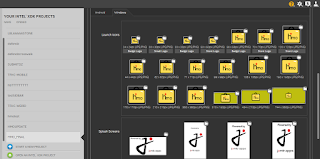
- Make sure all Launch Icons and Splash screen icons are filled
- Log in to your windows developer portal
- In your Windows developer account click Account settings.
- Under the contact info section is your publisher display name this is what you'll use as Author and Publisher display name.
- Under account settings is your Windows publisher ID this is what you'll use as your windows ID and windows phone ID eg CN=215466 4446 444, your ID is 215466 4446 444 (see illustration below)


- Read this too as from the XDK team.

- Log in to your windows developer portal
- In your Windows developer account click Account settings.
- Under the contact info section is your publisher display name this is what you'll use as Author and Publisher display name.
- Under account settings is your Windows publisher ID this is what you'll use as your windows ID and windows phone ID eg CN=215466 4446 444, your ID is 215466 4446 444 (see illustration below)


- Read this too as from the XDK team.
- What was missing in the above tutorial link is your App ID which is located when you click
yourappname>app management>app identity>Package/Identity/Name
After this go to your build page and build and douwnload your app
Big shout out to Intel !!!
How to Intergrate Admob Pro Plugin in Intel XDK app
Launch your app
Click on Project
Click on you app
Under Plugin Management click Add Plugins to this Project
Select the Third Party Plugins section
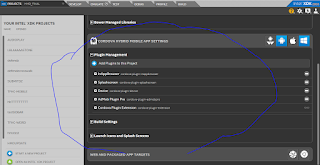
Make sure the cursor is on Cordova plugin registry
Enter in Plugin ID: cordova-plugin-admobpro (see image below)
Click Add Plugin and wait for XDK to download it to your app

Now here's the tricky part, go to your App
in the body of your index.html enter a javascript code see image
i.e directly under your <body> tag enter <script> </script>.
The admob code will go in between this script tag <script> "admob code" </script>
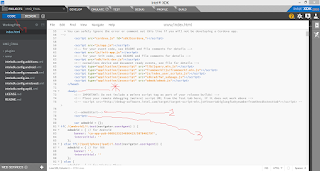
*- your body tag
2- is me noting a comment to know where the admob code is
3. the beginning of my javascript code
the javascript code I copy is from this link
Or you should view the complete demo here
Below is how it should be under your body tag
<script>
</script>
After this dependent on your target device, change the banner and/or interstitial code as gotten from Admob
and finally look through the code to change the isTesting to false i.e isTesting:false
Big Thanks and shout out to Raymond Xie for this !!!
Click on Project
Click on you app
Under Plugin Management click Add Plugins to this Project
Select the Third Party Plugins section

Make sure the cursor is on Cordova plugin registry
Enter in Plugin ID: cordova-plugin-admobpro (see image below)
Click Add Plugin and wait for XDK to download it to your app

Now here's the tricky part, go to your App
in the body of your index.html enter a javascript code see image
i.e directly under your <body> tag enter <script> </script>.
The admob code will go in between this script tag <script> "admob code" </script>
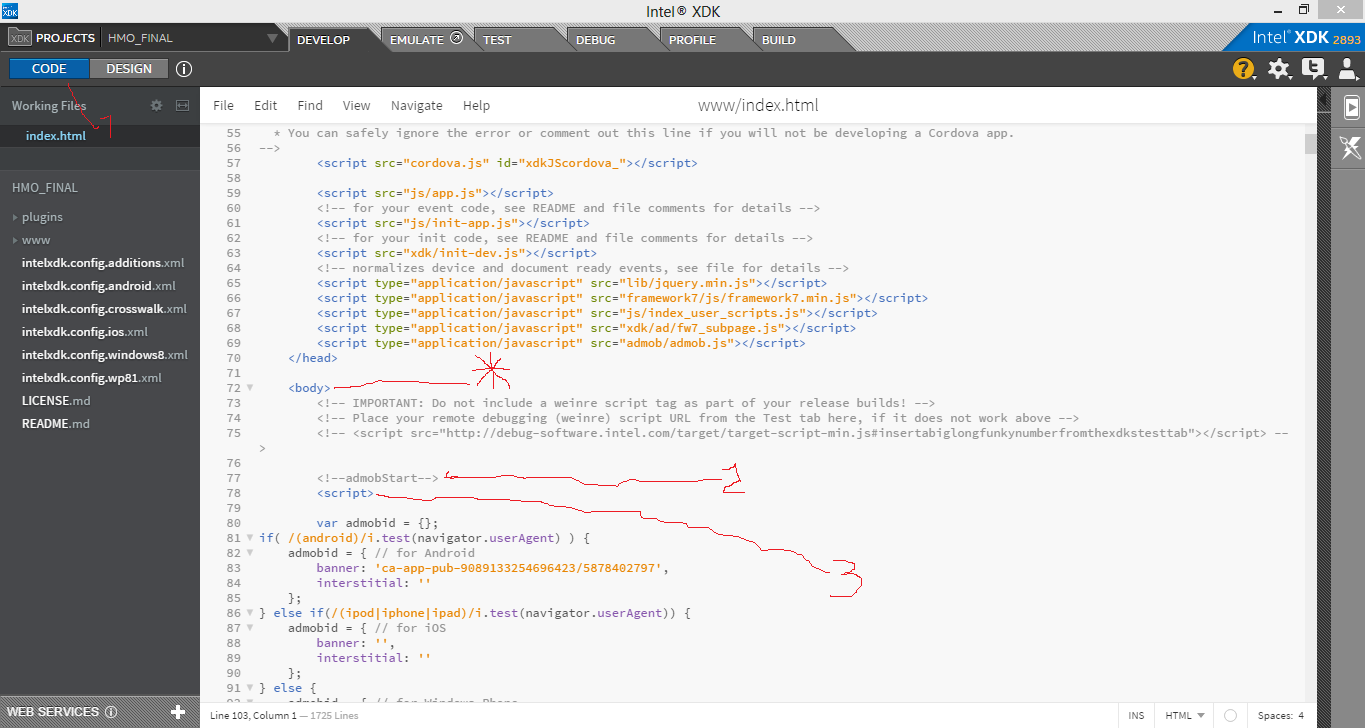
*- your body tag
2- is me noting a comment to know where the admob code is
3. the beginning of my javascript code
the javascript code I copy is from this link
Or you should view the complete demo here
Below is how it should be under your body tag
<script>
| var admobid = {}; | |
| if( /(android)/i.test(navigator.userAgent) ) { | |
| admobid = { // for Android | |
| banner: 'ca-app-pub-youradmobcode', | |
| interstitial: 'ca-app-pub-youradmobcode' | |
| }; | |
| } else if(/(ipod|iphone|ipad)/i.test(navigator.userAgent)) { | |
| admobid = { // for iOS | |
| banner: 'ca-app-pub-youradmobcode', | |
| interstitial: 'ca-app-pub-youradmobcode' | |
| }; | |
| } else { | |
| admobid = { // for Windows Phone | |
| banner: 'ca-app-pub-youradmobcode', | |
| interstitial: 'ca-app-pub-youradmobcode' | |
| }; | |
| } | |
| if(( /(ipad|iphone|ipod|android|windows phone)/i.test(navigator.userAgent) )) { | |
| document.addEventListener('deviceready', initApp, false); | |
| } else { | |
| initApp(); | |
| } | |
| function initApp() { | |
| if (! AdMob ) { alert( 'admob plugin not ready' ); return; } | |
| AdMob.createBanner( { | |
| adId: admobid.banner, | |
| isTesting: true, | |
| overlap: false, | |
| offsetTopBar: false, | |
| position: AdMob.AD_POSITION.BOTTOM_CENTER, | |
| bgColor: 'black' | |
| } ); | |
| AdMob.prepareInterstitial({ | |
| adId: admobid.interstitial, | |
| autoShow: true | |
| }); | |
| } | |
After this dependent on your target device, change the banner and/or interstitial code as gotten from Admob
and finally look through the code to change the isTesting to false i.e isTesting:false
Big Thanks and shout out to Raymond Xie for this !!!
Friday, November 13, 2015
Games on Oracle Apex.. Like Seriously !!!
By Anderson Rodrigues
2. CrappyBird
By Daniel Hochleitner
By Douglas Rofes
4. RPG
By Gabriel Dragoi
5 Alchemy
By Gabriel Dragoi
6 Yatzy
By Jari Laine
7 Lines
By Lev Erusalimskiy
8 Draw It
By Marc Hassan
9 Leonhard
By Marcelo Burgos
10 Rescue42
By Matt Mulvaney
11 Battleship
By Maxime Tremblay
12 MoviePick
By Nick Buytaert
13 Sudoku
By Nihad Haskovic
14 Tetris
By Pavel
15 Boggex
By Scott Wesley
Thursday, October 15, 2015
Admob Explained A little: For Beginner Developers
After making series of apps and learning, it's time to earn. There are many strategies to earn money via apps : In App Purchase, Advertising, Fremium..see here for app business lessons. I was lost until I learned my solution...Advertising.There are many others but this is the one I knew and if an app-ad agency better than admob exists I promise I'll hala here.
Heey do me a favor.. If you're a newbie..read this twice and the 1st time don't follow any links .. just read/skim through so you have an idea, the 2nd time you may follow the steps.
For Admob Gurus.. I stand correctible... please correct us if we're wrong.
Admob can be used for 2 purposes i.e you can get rich from admob via 2 means
Monetise Your App: App developers monetise their apps by adding a banner/interstitial place to place ads
Promote Other People's Apps: Have No skills ? , cool... just get those geeks in your street to pay you and you become a major marketer of their apps and websites, from your bedroom.(Oooooorrr. when you grow as a master app developer, you can cross promote your app. It's called in-house ads..oo yeah cross promote means if you have like 4 or 2 or more apps .. Adverts OF app 1, app 2 and app 4 can show on banners on app 2..)
In Admob, there are basically 2 kinds of ads
The Banner:
 These are the little things that display usually at the top or below app.
The Interstitial Ads: These show between pages transitions see below for proper illustation

To use Admob on your app, these generic stages are simple. I personally categorise them into
REGISTER YOUR APP: STAGE 1-2
REGISTER THE AD UNIT: STAGE 3-4 (Term: Ad unit will be explain later)
I use the word "register" because apps you add cannot be removed/deleted again rather it can be hidden from your dashboard also ad units in apps

Sign in/Sign up to admob using your gmail account or any other as accepted by Admob
-It shows you a dashboard probably (very empty for now. Don't worry, I too can't wait till you hit your 11 million downloads. Will be waiting for ya. Just stay in the game and keep being productive O.K )
- At the top You'll see 3 major sections/buttons Monetise, Promote and Analyse. These are dashboards for each section of Admob. The Home gives you an overall summary
This Admob-Help-Tutorial focuses on Monetising Apps
Click on Monetise New App


The Search for your app is for apps that are already in the google playstore and/or Itunes and would want to integrate Admob maybe in your next upgrade. or Apps that are ALREADY integrated with admob so DONT click here at least for your level now
Add App Manually : Uhuuuh yep.. this is for you .. yeah..you baby millionaire developer...or marketer..or C.E.O or whatever.This is for when you integrate the SDK into apps before its published
Selected from apps you've added: is for apps already in your admob account and you want to add another ad unit.
UUUUHH.... I hope u aren't tired ..
Stage 1
Select an App
Now for New Apps Select add app maually.. Name your app , select the platform being published. Windows Phone, IOS or Android and click on Add app
NOTE: The name you give your app here will be registered permanently.. I mean you can't change/edit it, hence you might want to consider the real name of your app so u don't make many silly mistakes like I've made.. THIS IS UN-CTL-"Z"-ABLE...."uneditable". Unless maybe you contact admob for them to remove. The only thing you can do is to HIDE it from your dashboard on the home page but it'll still be registered as yours.
Stage 2
Configure analytics for this app
This is what will be used for that Analytics section later .. so choose if you'll want to analyse usage of your app...But ofcourse we are all newbies together, we both want to try all things so click "Create a new tracking ID" but if you decline .. no issue. so...
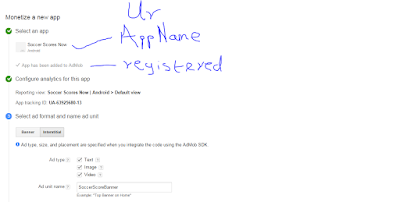
Stage 3
Select ad format and name ad unit
So which ads do you want to display on your app banners or interstitials
Lets do banners .. Banners are cute simple and straight forward
Click Banners
Ad Type: Tick the type of ad that will be displayed on your apps texts, images or both
Automatic Refresh: Well ....pros say we should leave the refresh rate at 60/50. The refresh rate is the rate/ speed at which ads are displayed ....in their words/terms they call these ads that display AD "Impressions"..hear what they have to say
Text Ad Style: Standard or Customized... Now honestly, I am not teaching you this, play around and figure this one out. Standard is for basic setup.. customized is if you want your "banner funkified with swagger"
Ad Unit Name: Name your ad unit. this is like (but not exactly) naming this particular banner inorder to identify it later.
...errrrr use '<yourappsname>banner' eg candycrushBanner
If its interstitials we want.. that's easy just tick the kind of ads texts ads, image ads or even videos..eww..imagine how annoying/interrupting video ads might be to some of your users especially on serious business apps..unless games though.I learned from JombApps.com the difference between app developement and app business..and app business is about user engagement if advertising is your strategy..but heey this is IT repo not business so.. FOCUS people !!
So select the ad formats acceptible in your app that you want to display on your app.
Click save
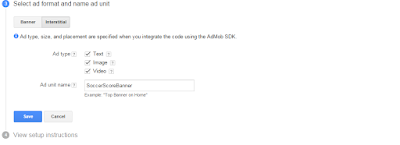
Ad Unit Name: this is like (but not exactly) naming this-particular interstitial inorder to identify it later.
use '<yourappsname>Interstitial' eg candycrushInterstitial
Now Click Save..
Immediately you click save .. Something called an Ad Unit Id is created for your app.
See Ad Unit professional definition
The Ad UNIT Name : This is your property.. you named it..yep u did..duuh? ... and
The Ad Unit ID: these codes are very important !!!.. these are what Admob will use to identify this particular banner in your app (or if you selected interstitial previously)and wherever your users .
Cut !!!!!! I'm tired.. This is too much marketing jargon..
Owkay Wait ..Owkay lets make it more complex.
An app.. your app can have 7 different ad units
Apps can have multiple pages right.
Your app/game is like a casino and the ad units are the flier-board at blackjack corner,the dice corner (pages in the app)etc. in the casino..different corners where ads will be displayed.. if your app has 2 pages you can post 2 different ad-units on each page.. or section of your casino..for 4 ad units ..2 banners at the top and 2 below...owkay thats a little crazy but you get the deal.... and personally ... ONE AD-UNIT CAN DISPLAY ON ALL PAGES so.. look into your app development method on how to do that. I develop mobile apps with Intel XDK
Your ad unit id is flier-board where ads will be served in the pages (blackjack corner,the dice corner) in your app (casino)
I'll end his here.
NOW YOUR APP HAS BEEN REGISTERED AND AD UNITS ARE ON IT
Now see tutorials on how to integrate SDK to your app use your . I will post the how-to for intel xdk developers later..When its is properly integrated into ur app ads will display when connected to internet.
In your flier-board(s).. where ads are served is where Admob ads (displayed automatically) lies in wait for you
In your flier-board(s).. where ads are served is where you can make your own ads: called house ads lies in
In your flier-board(s).. where ads are served is where you can make use of other 3rd party ad networks to display ads on your app:
Click the MONETISE TAB at the top
Select your app and at the mediation (meaning supply or intervention) section
Click on your ad source to do this.

Thanks for reading. Have fun.
Heey do me a favor.. If you're a newbie..read this twice and the 1st time don't follow any links .. just read/skim through so you have an idea, the 2nd time you may follow the steps.
For Admob Gurus.. I stand correctible... please correct us if we're wrong.
ADMOB
After developing your app, you would have to integrate the Admob SDK into your app to be able to display ads.Admob can be used for 2 purposes i.e you can get rich from admob via 2 means
Monetise Your App: App developers monetise their apps by adding a banner/interstitial place to place ads
Promote Other People's Apps: Have No skills ? , cool... just get those geeks in your street to pay you and you become a major marketer of their apps and websites, from your bedroom.(Oooooorrr. when you grow as a master app developer, you can cross promote your app. It's called in-house ads..oo yeah cross promote means if you have like 4 or 2 or more apps .. Adverts OF app 1, app 2 and app 4 can show on banners on app 2..)
In Admob, there are basically 2 kinds of ads
The Banner:
The Interstitial Ads: These show between pages transitions see below for proper illustation

TO MONETISE YOUR APP
REGISTER YOUR APP: STAGE 1-2
REGISTER THE AD UNIT: STAGE 3-4 (Term: Ad unit will be explain later)
I use the word "register" because apps you add cannot be removed/deleted again rather it can be hidden from your dashboard also ad units in apps

Sign in/Sign up to admob using your gmail account or any other as accepted by Admob
-It shows you a dashboard probably (very empty for now. Don't worry, I too can't wait till you hit your 11 million downloads. Will be waiting for ya. Just stay in the game and keep being productive O.K )
- At the top You'll see 3 major sections/buttons Monetise, Promote and Analyse. These are dashboards for each section of Admob. The Home gives you an overall summary
This Admob-Help-Tutorial focuses on Monetising Apps
Click on Monetise New App


The Search for your app is for apps that are already in the google playstore and/or Itunes and would want to integrate Admob maybe in your next upgrade. or Apps that are ALREADY integrated with admob so DONT click here at least for your level now
Add App Manually : Uhuuuh yep.. this is for you .. yeah..you baby millionaire developer...or marketer..or C.E.O or whatever.This is for when you integrate the SDK into apps before its published
Selected from apps you've added: is for apps already in your admob account and you want to add another ad unit.
UUUUHH.... I hope u aren't tired ..
Stage 1
Select an App
Now for New Apps Select add app maually.. Name your app , select the platform being published. Windows Phone, IOS or Android and click on Add app
NOTE: The name you give your app here will be registered permanently.. I mean you can't change/edit it, hence you might want to consider the real name of your app so u don't make many silly mistakes like I've made.. THIS IS UN-CTL-"Z"-ABLE...."uneditable". Unless maybe you contact admob for them to remove. The only thing you can do is to HIDE it from your dashboard on the home page but it'll still be registered as yours.
Stage 2
Configure analytics for this app
This is what will be used for that Analytics section later .. so choose if you'll want to analyse usage of your app...But ofcourse we are all newbies together, we both want to try all things so click "Create a new tracking ID" but if you decline .. no issue. so...

Stage 3
Select ad format and name ad unit
So which ads do you want to display on your app banners or interstitials
Lets do banners .. Banners are cute simple and straight forward
Click Banners
Ad Type: Tick the type of ad that will be displayed on your apps texts, images or both
Automatic Refresh: Well ....pros say we should leave the refresh rate at 60/50. The refresh rate is the rate/ speed at which ads are displayed ....in their words/terms they call these ads that display AD "Impressions"..hear what they have to say
Text Ad Style: Standard or Customized... Now honestly, I am not teaching you this, play around and figure this one out. Standard is for basic setup.. customized is if you want your "banner funkified with swagger"
Ad Unit Name: Name your ad unit. this is like (but not exactly) naming this particular banner inorder to identify it later.
...errrrr use '<yourappsname>banner' eg candycrushBanner
OOOOOOOOOORRRRRR
For Interstitials AdsIf its interstitials we want.. that's easy just tick the kind of ads texts ads, image ads or even videos..eww..imagine how annoying/interrupting video ads might be to some of your users especially on serious business apps..unless games though.I learned from JombApps.com the difference between app developement and app business..and app business is about user engagement if advertising is your strategy..but heey this is IT repo not business so.. FOCUS people !!
So select the ad formats acceptible in your app that you want to display on your app.
Click save

Ad Unit Name: this is like (but not exactly) naming this-particular interstitial inorder to identify it later.
use '<yourappsname>Interstitial' eg candycrushInterstitial
Now Click Save..
Immediately you click save .. Something called an Ad Unit Id is created for your app.
See Ad Unit professional definition
The Ad UNIT Name : This is your property.. you named it..yep u did..duuh? ... and
The Ad Unit ID: these codes are very important !!!.. these are what Admob will use to identify this particular banner in your app (or if you selected interstitial previously)and wherever your users .
 |
| Interstitial Selected |
Cut !!!!!! I'm tired.. This is too much marketing jargon..
Owkay Wait ..Owkay lets make it more complex.
An app.. your app can have 7 different ad units
Apps can have multiple pages right.
Your app/game is like a casino and the ad units are the flier-board at blackjack corner,the dice corner (pages in the app)etc. in the casino..different corners where ads will be displayed.. if your app has 2 pages you can post 2 different ad-units on each page.. or section of your casino..for 4 ad units ..2 banners at the top and 2 below...owkay thats a little crazy but you get the deal.... and personally ... ONE AD-UNIT CAN DISPLAY ON ALL PAGES so.. look into your app development method on how to do that. I develop mobile apps with Intel XDK
Your ad unit id is flier-board where ads will be served in the pages (blackjack corner,the dice corner) in your app (casino)
I'll end his here.
NOW YOUR APP HAS BEEN REGISTERED AND AD UNITS ARE ON IT
Now see tutorials on how to integrate SDK to your app use your . I will post the how-to for intel xdk developers later..When its is properly integrated into ur app ads will display when connected to internet.
In your flier-board(s).. where ads are served is where Admob ads (displayed automatically) lies in wait for you
In your flier-board(s).. where ads are served is where you can make your own ads: called house ads lies in
In your flier-board(s).. where ads are served is where you can make use of other 3rd party ad networks to display ads on your app:
Click the MONETISE TAB at the top
Select your app and at the mediation (meaning supply or intervention) section
Click on your ad source to do this.

Thanks for reading. Have fun.
Tuesday, September 15, 2015
Pivot Table Plugin for Oracle Apex
Woow. I just found something reaally awesome.Though I've not tested it. I just hope it works on Apex 5
Link to download plugin is
https://code.google.com/p/plsql-utils/downloads/detail?name=region_type_plugin_muledev_pivot_region.sql
Click here to follow.
And this is the blog I found it + he wrote some tutorials on it too :
http://ora-00001.blogspot.com.ng/2013/10/pivot-table-plugin-for-apex.html
Click here to follow.
Much Respect sir: Morten Braten. Much Respect
Link to download plugin is
https://code.google.com/p/plsql-utils/downloads/detail?name=region_type_plugin_muledev_pivot_region.sql
Click here to follow.
And this is the blog I found it + he wrote some tutorials on it too :
http://ora-00001.blogspot.com.ng/2013/10/pivot-table-plugin-for-apex.html
Click here to follow.
Much Respect sir: Morten Braten. Much Respect
Subscribe to:
Posts (Atom)
SOLVED: SVCHOST ISSUE
Any time this iss If on your task manager you see svchost taking much physical memory 1 On your task manager ...

-
 Launch your app Click on Project Click on you app Under Plugin Management click Add Plugins to this Project Select the Third Party Plu...
 -
 Any Android App’s Graphic Assets Checklist 1. Screenshots Images(For Phone, Tablet and TV Images ) *(Required) To publish your app/”St...
 -
Here is just a link I found to integrate Appodeal plugin into your project. You might need to look in the example of each to understand h...